Switching to first-person view in GTA 5 transforms familiar streets into something far more intense. Every chase, crash, and firefight feels personal, as if you’re truly behind the wheel or holding the trigger yourself. Here’s how to make the most of Rockstar’s most immersive perspective yet.
More realism more details = loads of fun.
The most developed and awaited change in the GTA 5 was supposed to be a highly detailed view mode from a first person perspective. It moves the entire game in a new level, as it allows to look at the world in an unique way not only during the exploration of the terrain or during the fighting, but also when driving and flying machines.
To start it you have to switch between the camera modes using the touch panel, and of course stay on the right one. After activation, the view will be shown from the character’s perspective which will highly influence the surroundings reception, steering and graphic effects. In connection with new camera mode, the creators have introduced a lot of new animations of the ways of moving and of fight, and, what’s more, have reconstructed the appearance of cockpits of conducted vehicles.
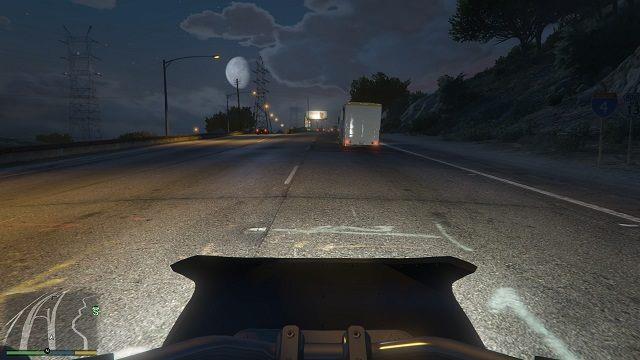
Only me, my motorbike and a wide highway.
When using the first-person mode options we can experience many new things but on the other hand – at least at the beginning – we can as well experience difficulties related to the free exploration of the world presented. At this point it is all about managing the aforementioned cars, motorbikes or helicopters. Looking from the hero perspective, the visibility range is significantly reduced, which translates directly into the quality of sense of direction and the opportunity to experience collisions. Well, you can get used to everything, especially when it implies great moments and breathtaking views.
How to adjust FOV and head-bob in GTA 5 first person mode
GTA 5 allows precise tweaks to FOV and head-bob in first-person mode via in-game settings menus. These adjustments enhance immersion and reduce motion sickness for many players.
Accessing Settings
Navigate to Settings > Camera on consoles (PS4/5 touchpad or Xbox Select to open) or PC pause menu. Scroll to first-person options, where sliders and toggles appear for on-foot and vehicle views.
Adjusting FOV
Use the “First Person On Foot Field of View” slider under Camera settings to widen or narrow your view-higher values expand peripheral vision significantly. A separate slider handles vehicle FOV; note that some players report limited driving adjustments without mods, though in-game tweaks suffice for most.
Disabling Head-Bob
Toggle “First Person Head Bobbing” off in Controls or Camera settings to eliminate running/walking sway. This steadies the camera without affecting animations elsewhere, ideal for smoother aiming.
Best FOV settings for GTA 5 first person driving
GTA 5 first-person driving benefits from higher FOV settings to improve peripheral vision and reduce distortion around corners. Optimal values balance immersion with control, often maxing in-game sliders or using PC tweaks.
Recommended FOV
Set “First Person Vehicle Field of View” to maximum (around 85-90 degrees horizontal in vanilla game) via Settings > Camera for better road awareness. Players commonly recommend 90-120 degrees with mods like GTA V FoV for ultra-wide views, pulling the camera back from the dash.
Additional Tweaks
Raise “Vehicle Camera Height” to High for elevated seating position and disable “First Person Head Bobbing” to steady the view during turns. Pair with max “First Person On Foot Field of View” (up to 85 degrees stock) for seamless transitions.