One moment your revolvers and rifles fill the satchel; the next, they’re gone without a trace. What vanished your arsenal in Red Dead Redemption 2?
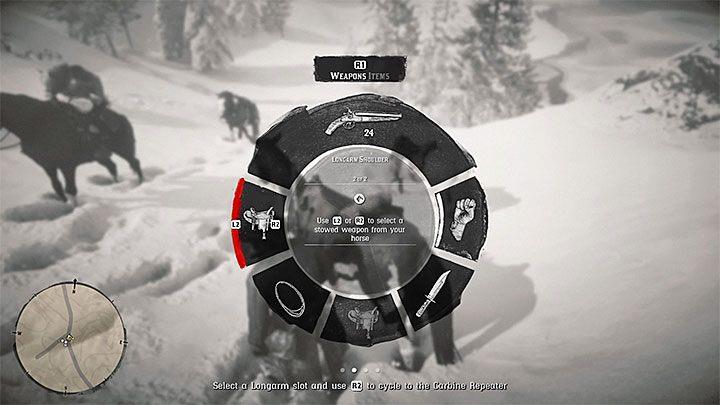
Fortunately, the solution to the problem of “disappearing weapons” is very simple. These weapons are not taken away from Arthur permanently and do not disappear irretrievably from his list of equipment. Instead, they are stored for the journey in panniers attached to the saddle of the horse (the one that is marked as owned by Arthur).
If you want to equip the hero with some other weapon, you have to approach the horse and press the button to open the weapon menu (default L1/LB). Highlight one of the weapon slots and use triggers to select the weapon you are interested in.
How to retrieve weapons from my horse saddle in RDR2
Approach your owned horse (the one with your character’s icon above it) in Red Dead Redemption 2 to access stowed weapons on its saddle. Weapons automatically holster there after riding or unequipping, so they’re not lost from inventory.
Access Saddle Inventory
Hold the inventory key near your horse: TAB on PC, L1 on PS4/PS5, or LB on Xbox. Navigate to the saddle section (often at 6 or 9 o’clock positions on the wheel) to select and equip longarms like rifles, shotguns, or bows.
Equip Weapons
Once selected, the weapon transfers to your personal loadout slots (e.g., longarm or sidearm). Ride briefly and spam the holster button (R2/RT) if glitched, as firing or holstering can force items to reappear in the saddle.
Troubleshooting Tips
-
Call your horse with the whistle (Up on D-pad) if it’s far away.
-
Check camp weapon lockers or gunsmiths for permanent storage/custom variants.
-
Avoid selling horses without inspecting saddlebags first to prevent losses.
How to view saddlebag inventory on PC PS4 Xbox controls
To view your horse’s saddlebag inventory in Red Dead Redemption 2, approach your owned horse (with your character’s icon) and hold the designated inventory key or button for your platform.
PC Controls
Hold TAB near the horse to open the weapon wheel, then navigate to the horse’s saddle section (typically indicated on-screen). Alternatively, some players report holding B accesses a broader inventory wheel including saddle items; use your mouse to select weapons or gear and release to equip.
PS4/PS5 Controls
Hold L1 to bring up the weapon wheel, then use R1 to cycle to horse cargo/saddle tabs, or hold Right D-Pad directly for satchel and horse inventory access. Highlight the saddle slot with the right stick and release to transfer items like weapons.
Xbox Controls
Hold LB for the weapon wheel and tap RB to switch to items/horse cargo, or hold Right D-Pad when close to the horse. Select saddle-stowed weapons via the left stick and confirm to equip them to your loadout.
