Mastering GTA 5 on PS3 starts with knowing how every button shapes the action – from sharp turns during high-speed chases to quick weapon swaps in the heat of a heist. This guide breaks down the controls you need to rule Los Santos with precision.
Movement on foot
In GTA 5 on PS3, move your character with the left analog stick, which handles forward, backward, strafe left and right. Sprint by holding L3 (press left stick). Jump with X, and crouch or climb with Circle. Use R3 (press right stick) to glance behind while running. Shift between walking and running speeds by tapping L3 lightly.
|
|
Move |
|
|
Sneak |
|
|
Change camera position |
|
|
Zoom in while targeting/ Look behind |
|
|
Run/Strong melee attack |
|
|
Reload/ Light melee attack |
|
|
Jump/Get over an obstacle/ Dodge in melee fight |
|
Take control over a means of transport | |
|
|
Telephone |
|
|
Character selection/Hide phone |
|
|
Navigate the phone’s menu |
|
|
Navigate the phone’s menu |
|
|
Bring up the weapon menu |
|
|
Target |
|
|
Hide behind a cover |
|
|
Shoot |
|
|
Change camera |
|
|
Pause |


In a vehicle
While driving in GTA 5 on PS3, use the left stick to steer and the right trigger to accelerate. The left trigger applies the brakes or reverses when stationary. Press the circle button to fire weapons from inside the vehicle, and use L1 to aim if needed. The square button handles handbrakes for sharper turns, while R3 toggles headlights. Pressing the triangle button lets your character enter or exit the vehicle quickly.
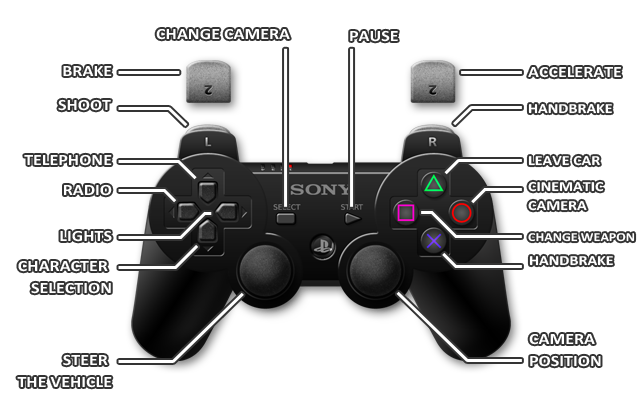
|
|
Steer the vehicle |
|
|
Honk |
|
|
Change camera position |
|
|
Look back |
|
|
Handbrake |
|
|
Cinematic camera |
|
|
Change weapon |
|
Leave the vehicle | |
|
|
Telephone |
|
|
Select character |
|
|
Bring up the radio station selection window |
|
|
Turn on lights |
|
|
Shoot while driving |
|
|
Brake/Rev up |
|
|
Handbrake |
|
|
Accelerate |
|
|
Change camera |
|
|
Pause |


PS3 button layout for driving and combat in GTA V
GTA V on PS3 uses the DualShock 3 controller with distinct layouts for driving and combat, optimized for quick reflexes in chases and shootouts. Driving prioritizes smooth acceleration and steering, while combat emphasizes precise aiming and cover use.
Driving Controls
Core vehicle handling focuses on the left stick and triggers for speed control.
| Action | Button(s) |
|---|---|
| Steer | Left Stick |
| Accelerate | R2 (hold) |
| Brake/Reverse | L2 |
| Handbrake | R1 |
| Horn | L3 (press) |
| Look Behind | R3 (press) |
| Exit Vehicle | Triangle |
| Drive-By Shoot | L1 + R1 |
| Radio Wheel | D-Pad Left (hold) |
| Headlights | D-Pad Right |
| Cinematic View | Circle |
Combat Controls
Aiming locks onto targets with L2, enabling movement while firing.
| Action | Button(s) |
|---|---|
| Aim/Lock-On | L2 |
| Shoot/Fire | R2 |
| Take Cover | R1 (tap/hold) |
| Reload/Melee Light | Circle |
| Melee Heavy | R2 (hold) |
| Jump/Dodge | Square |
| Sprint | X (hold) |
| Weapon Wheel | L1 (hold) |
| Grenade | L1 + Circle |
Show default DualShock 3 button map for driving controls
GTA V on PS3 uses the default DualShock 3 layout for driving, with analog triggers for precise throttle and braking. Steering relies on the left stick, mimicking real-world car handling in Rockstar’s open world.
Default Driving Map
This table shows the standard button assignments for vehicles in GTA V story mode on PS3.
| Action | Button(s) |
|---|---|
| Steer | Left Stick |
| Accelerate | R2 (hold) |
| Brake/Reverse | L2 |
| Handbrake | Circle (O) |
| Horn | L3 (press) |
| Look Left/Right | L3 (tilt) |
| Look Behind | R3 (press) |
| Radio Station | D-Pad Left |
| Exit Vehicle | Triangle |
| Cinematic Camera | D-Pad Down |
| Headlights | D-Pad Right |
| Drive-By Shoot | L1 (aim) + R1 (fire) |
