A missing hat haunts the plains of the New World, and every boot print hints at a deeper trail you’re meant to follow.
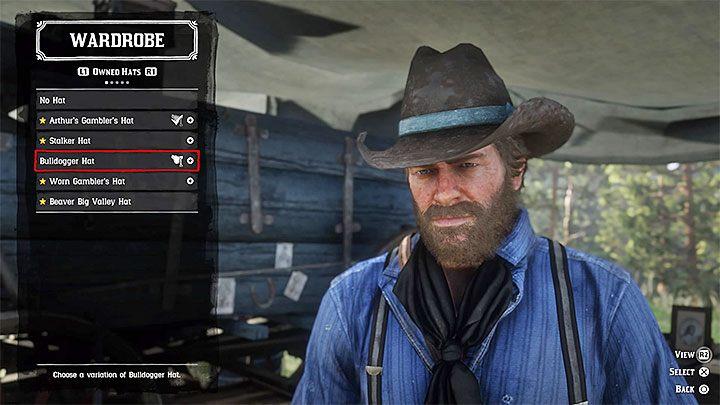
Losing a hat in RDR 2 isn’t that important but it can be irritating when you lose your favorite hat bought at a store.
- Look around the place where you have lost your hat. There is a good chance that it hadn’t disappeared yet which means that you will be able to pick it up.
- Go back to your gang hideout if you can’t find the hat. Head to Arthur’s tent and interact with the chest containing your pieces of clothes (see the picture 1). Go to the Hats tab and select the headwear from the list. Hats are assigned to you permanently when you receive them or purchase at a store.
Additional note – This chest also has all other pieces of clothes owned by your character. Go back to it when you have to, i.e. change winter clothes to those fit for summer.
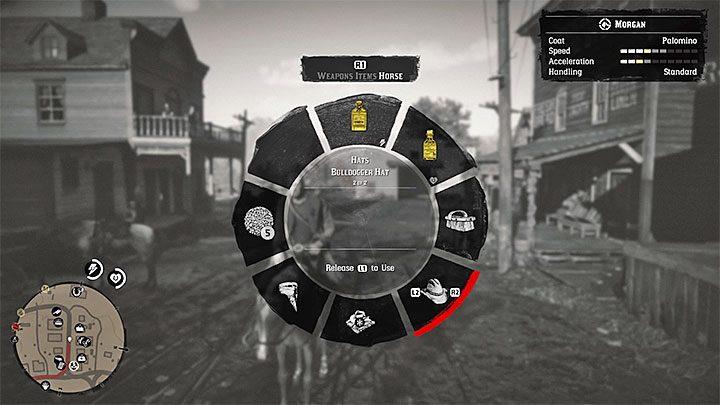
The process of retrieving your hat can be “automatized” – you won’t have to go back to the clothes chest every time you lose a hat. You can do that by assigning a hat to your horse’s inventory. Highlight the hat you want to assign, and press the button to add it to your horse’s inventory (Square is the default button on PlayStation 4).
Assign a hat to my horse inventory step by step
Here is a simple step-by-step way to assign hats to your horse inventory in Red Dead Redemption 2, using information from in-game guides and player discussions.
Prerequisites
-
Make sure the hat is actually owned or saved: story hats, bought hats, and most “found/stolen” hats you picked up and then saw later in your camp wardrobe can be managed this way.
-
Remember your horse can only hold a limited number of extra hats at once (commonly up to three, similar to outfits).
Step 1 – Go to a wardrobe
-
Travel to a wardrobe: camp chest, hotel room wardrobe, or tailor/general store changing room all work.
-
Interact with the wardrobe to open the clothing menu and go to the Hats section.
Step 2 – Choose which hats to put on the horse
-
In the Hats section, highlight the hat you want on your horse; owned and saved hats will appear here (including many stolen or found ones).
-
Look at the bottom of the screen for the button prompt that says something like “Store on horse” or shows a horse icon; press that button to assign the hat to your horse inventory.
Step 3 – Manage the hat slots
-
If your horse already has the maximum number of hats stored, you must first remove one from the horse via the same wardrobe screen before adding a new one.
-
After freeing a slot, repeat Step 2 for any new hat you want your horse to carry.
Step 4 – Equip hats from your horse
-
Stand next to your horse (or mount up) and open the weapon/item wheel, then tab over to the Horse section.
-
In that wheel, select the hat icon (usually at the edge of the wheel) to cycle or pick from the hats you stored on the horse and instantly wear the chosen one.
How do I open the horse radial menu on console and PC
On console, the horse/item weapon wheel (the radial menu you use to pick hats from your horse) is opened with the left shoulder button while near or on your horse, and on PC it is opened with the default keyboard key that emulates that same wheel (often the tab-style “weapon wheel” key you use for guns and items).
Direct confirmation for Red Dead Redemption 2’s exact default keyboard binding for the horse radial is not available right now, so here is how to reliably find or adjust it in-game:
On PlayStation and Xbox
-
Hold the left bumper (L1 on PlayStation, LB on Xbox) while standing next to or riding your horse to open the circular weapon/item wheel that includes horse items like hats and saddlebags.
-
While holding that button, tilt the right stick toward the hat or item you want, then release the bumper to equip or use the selected slot.
On PC (keyboard and mouse)
-
Press and hold the key that opens your weapon/item wheel (the same wheel you use on foot); many players bind this to a convenient key such as Tab, but the exact default cannot be confirmed here.
-
To check or change it:
-
Open Settings → Controls → Keyboard & Mouse → Key Mapping.
-
Look for an entry labeled like “Weapon Wheel,” “Item Wheel,” or “Weapon/Item Select” and note or remap the key, then use that while near/on your horse to open the radial.
-