Crafting your identity in GTA Online is as unique as the chaos of Los Santos itself. From selecting your grandparents to shaping your lifestyle and appearance, Rockstar’s innovative GTA Online character creation system (the GTA 5 character maker) lets you build a persona that’s truly your own, whether it’s a law-abiding pilot or a party-loving outlaw. This guide walks you through every step to design your perfect criminal avatar.
GTA Online Gender Selection: Your First Permanent Decision
The moment you enter the character creator, you’ll choose your character’s gender. This decision is permanent. Rockstar has confirmed there’s no way to change gender after creation. The only workaround is using your second character slot, which means starting fresh on properties, vehicles, and progress.
Both male and female characters have access to the same content, missions, and clothing options. Neither choice puts you at a disadvantage. Take your time before moving on.
GTA Online Career Builder (New-Gen Consoles)
On PS5, Xbox Series X|S, and PC (Enhanced), the character creator runs as part of the Career Builder system. Before you even reach the customization screen, you’re handed a one-time GTA$4,000,000 starting fund and asked to commit to a criminal career path, with that money going toward a property, vehicles, and weapons tied to your chosen path. The catch is that this isn’t free money to bank: you’re required to spend at least $3,000,000 of it before you’re allowed to continue, and whatever’s left over caps out at $1,000,000 once you carry it into Los Santos. Once those purchases are locked in, you move on to the character customization screen. On older platforms, there’s no Career Builder step – you go straight into the creator.
GTA Online Heritage System: Building Your Character’s Foundation
The Heritage section is the backbone of your character’s look. Instead of sculpting a face from scratch, GTA Online has you choose from two parents and generates a blend of their features as the base for your character’s appearance.
Selecting Grandparents and Parents
You’ll pick four grandparents, which auto-generates your character’s parents and basic facial structure (skin tone, jaw, nose, etc.). The Heritage section lets you pick a Mom and Dad from 21 generic models of each gender, with the parent models spanning a range of races and facial types. Your character’s race is determined by the combination you select.
On PS4, Xbox One, and PC, you also have the option to swap in special characters from earlier Rockstar titles instead of a generic parent: Claude and Misty from GTA 3, Niko Bellic from GTA 4, and John Marston from Red Dead Redemption (available as a father option only). These are purely cosmetic picks with zero effect on gameplay, but they’re worth using sparingly – leaning on a recognizable face like Marston for every character you make tends to flatten your results into something less personal, so treat it as an occasional flourish rather than a default choice.
Using Heritage Sliders Effectively
Once you’ve locked in your parents, two sliders let you fine-tune the result. The Resemblance slider controls how many facial traits your character inherits from each parent, and a separate Skin Tone slider works the same way for complexion.
Keep the Resemblance slider toward the middle for a balanced blend that looks more natural. Pushing it toward one parent makes your character look noticeably more like that side of the family. The Skin Tone slider is independent, so you can lean toward your mother’s facial features but match your father’s complexion.
A common mistake is focusing too heavily on one parent and ending up with overly exaggerated features. If your character doesn’t look right after adjusting the sliders, try a different parent combination before assuming the Features section will fix it. Heritage is the foundation, and it’s much easier to get right here than to correct it later.
GTA Online Appearance Customization: Fine-Tuning Facial Features
Once Heritage is done, the creator moves into the Appearance and Features sections, where you get into the actual details of how your character’s face looks. For more GTA Online character appearance tips, experiment with different combinations of features and overlays.
Facial Features and Age Settings
The Features section lets you make significant changes to your character’s facial structure across eleven different elements, with preset options and a custom setting controlled through a scatter graph. This covers things like brow shape, nose width, jaw definition, and cheekbone height.
The Appearance section builds on this further with eleven categories that include effects to simulate aging, such as wrinkles, blemishes, and skin damage. You can set your character’s age anywhere from 21 to 40, with older settings adding visible wear to the face. Going too heavy on aging effects tends to produce results most players aren’t happy with, so keep those sliders subtle unless you’re going for a specific look.
One thing worth knowing is that you cannot change your character’s body shape, height, or muscle mass directly in the character creator. Both male and female characters have fixed heights, and physique is not adjustable at creation.
Hair, Makeup, and Skin Tone
The Appearance section covers hairstyle, hair color, makeup, and skin tone modifications, all of which contribute to how polished or distinct your character ends up looking. Hair options differ between male and female characters, with male characters getting access to facial hair styles as well.
Makeup is available to both genders, though the range of options is more extensive for female characters. Skin tone modifications go beyond just the Heritage sliders and let you add things like complexion adjustments, sun damage, and aging marks on top of whatever base the Heritage section produced.
Changing Appearance Later
Nothing here is locked in forever – except gender. Hairstyle, hair color, makeup, eyebrows, facial hair, and face paint can all be adjusted at any barber shop or clothing store around Los Santos for a small fee, any time you like. If you want to redo the whole face, that’s possible too: from the Interaction Menu, go to Style > Change Appearance, and Rockstar will charge you GTA$100,000 per change. There’s one way to do it for free, though – your first new online session after hitting Rank 6 comes with a one-time complimentary appearance change, so if you’re not happy with how your character turned out, it’s worth holding off and using that window instead of paying right away.
A good approach is to make a solid, not-too-extreme base face, then refine it later once you see how it looks in normal gameplay and different outfits.
GTA Online Lifestyle Allocation: Setting Your Starting Stats
The Lifestyle section is where GTA Online character creation crosses over from aesthetics into actual gameplay. Most new players rush through it without realizing it has a direct impact on how their character performs from the moment they load in.
How Lifestyle Activities Affect Stats
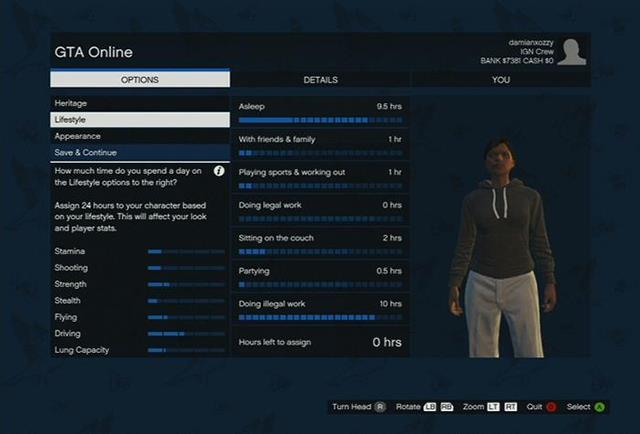
Your stats aren’t picked directly – they come out of how you divide a 24-hour day across seven lifestyle categories, each tied to specific skills. Wherever you spend the most hours is what shapes your character’s starting skill set.
You’re working with 140 total percentage points across the seven categories. Forty of those are pre-allocated as fixed minimums you can’t remove, which leaves you 100 points to actually distribute as you see fit.
| Lifestyle Activity | Stats Increased | Stats Decreased |
|---|---|---|
| Asleep | Stamina, Strength, Stealth, Lung Capacity | None |
| Friends & Family | Stamina, Driving | Shooting |
| Sports & Working Out | Stamina, Strength, Lung Capacity | Shooting |
| Legal Work | Stamina, Stealth, Flying | Driving |
| Sitting on the Couch | Flying, Driving | Strength, Stamina, Lung Capacity |
| Partying | Shooting, Stealth | Stamina, Strength, Flying, Lung Capacity |
| Illegal Work | Stamina, Stealth | Flying |
Recommended Beginner Pattern
For most players just starting out, putting more points into Shooting, Strength, and Stamina gives the most useful early-game advantage. Driving and Stamina improve naturally as you play, so they don’t need as many points upfront. Strength, on the other hand, is one of the harder stats to build up later, so investing in it at creation saves time.
A beginner-friendly setup focuses on stamina, shooting, strength, and driving. One suggested pattern is:
- Asleep: about 9.5 hours
- With family & friends: about 1 hour
- Playing sports & working out: about 1 hour
- Sitting on the couch: about 2 hours
- Partying: about 0.5 hours
- Doing illegal work: rest of the hours (this helps make your character look more “criminal” and boosts useful stats).
Keep in mind this is your only shot at a stat head start through Lifestyle – once you’ve finished character creation, the only way to raise these numbers is by actually playing (running, swimming, shooting, and so on), so it’s worth spending a few extra minutes getting the allocation right here rather than skipping past it.
GTA Online Starting Outfit and Apparel
The last step before you hit the streets is choosing your starting outfit. The Apparel section lets you set your initial outfit, hat, glasses, and crew t-shirt options, with eight overall style options, each offering eight outfit variations to choose between – enough range to land somewhere between casual streetwear and a rougher look without overwhelming you with choices. If you’re already in a crew, you can also add a crew t-shirt on top.
Some starting outfits include pieces that aren’t sold individually in stores, and a few of those pieces can end up rank-locked if you try to buy them separately later on. The fix is simple: head to any clothing store right after you load in and save your starting outfit there. That locks the included items into your wardrobe permanently, even the ones you’d otherwise have to wait to unlock. It’s an easy step that a lot of new players skip, and skipping it is the kind of thing that’s annoying to realize later.
Beyond that, don’t overthink this part. GTA Online has thousands of clothing items split across categories, including tops, pants, shoes, hats, accessories, glasses, and full outfits, all waiting for you once you’re actually in the game. Whatever you pick here is just a starting point, and you’ll be swapping pieces out within the first few hours of playing anyway.
GTA Online Character Slots and Management
GTA Online gives every player two character slots to use. That’s the limit – older console versions of the game once showed placeholder slots beyond that, but Rockstar never activated them, and two has remained the cap ever since. Each slot holds a fully separate character with its own appearance, stats, rank, properties, and vehicles.
Your two characters aren’t entirely isolated from each other, though: they draw from the same bank account, so cash you deposit on one is available to spend on the other. Cash kept in a character’s pocket (rather than the bank) and RP do not carry over between them.
When creating a second character, you have the option to copy the rank of your first character, up to a maximum of Rank 120. Doing so lets the new character skip the intro mission and tutorial, and it has no effect on your first character’s rank either way.
What doesn’t transfer are properties, vehicles, weapons, and clothing – each character builds that progress independently from zero. So if your plan for the second slot is just to try a different gender or a fresh look, go in knowing you’re genuinely starting over on every in-game asset, even though the bank balance follows you. That said, the second slot remains the only legitimate way to play as a different gender in GTA Online, since gender is locked once a character exists – so if you’ve had a change of heart, this is the route to take.
GTA Online Advanced Heritage Blending Tips
If you want to push your Heritage results further than the basics, here are a few techniques experienced players rely on for building more attractive or distinctive characters – including some GTA 5 Online female character tips that work especially well for refining a feminine build.
Face Shape and Side Profile Considerations
Face shape (round, oval, squared) can say more about your character’s personality than any individual feature, which matters more than usual here since your character never speaks on-screen and has to communicate who they are through looks alone. Certain hairstyles work better depending on the shape of your character’s head – a principle that holds some truth in real life too.
The side profile is a part of the build players often skip. Since only a handful of features include a “depth” setting, you can’t reshape the overall head profile as freely as you might want – but the features that do offer depth still matter. A more pronounced forehead reads as more aggressive, or can create the illusion of larger eyes, while a flatter, more neutral forehead tends to give a softer, more conventionally aesthetic look.
The Rule of Four
When picking head models, weigh four things at once: eyes, mouth, face shape, and side profile. Because you’re only blending two head models together, you’re very unlikely to nail all four criteria simultaneously – skin tone adds another constraint on top of that. The practical move is to decide upfront which of these matters most for the look you’re going for.
A good starting point is to prioritize the features you can’t adjust afterward, namely the eyes and mouth – since you have no way to tweak their size, curvature, or spacing once Heritage is locked in, getting them right at this stage pays off more than anything else. The same logic applies to the mouth: lips have almost no customization later, so if you want a particular lip shape to define your character’s look, this is your one chance to lock it in.
GTA Online FAQ
How do I create a character in GTA Online?
The character creator opens automatically the first time you launch GTA Online. After that, you can return to it any time through Choose Character in the Online tab of the Pause Menu, or via Swap Character once you’re already online.
What is a character creator in GTA Online?
It’s the tool used to build each of the two character slots on your account – covering gender, heritage, appearance, lifestyle, and starting outfit in one guided process.
How do I play as a different gender in GTA Online?
Create a second character. Every account has two slots, so you don’t need to delete your existing one – just go to the character selection screen, pick the empty slot, and run through creation from scratch with the gender you want.
Can you change gender in GTA Online?
No. Nearly everything about your character – facial features, heritage, outfits, hairstyle – can be revisited later, but gender locks the moment you confirm it during creation, with no official way to undo that choice afterward.
How do you start GTA Online?
Character creation comes first, before you can do anything else. Unlike most games’ quick “pick a skin” setup, your character’s whole look here is built from deeper factors like heritage and lineage rather than chosen feature by feature.